
Digital work reports, signed on the phone
Zetein's work report replaces the paper one. The field worker fills it in on the phone, the customer signs with a finger and the office has it filed in its project, with nothing to retype.
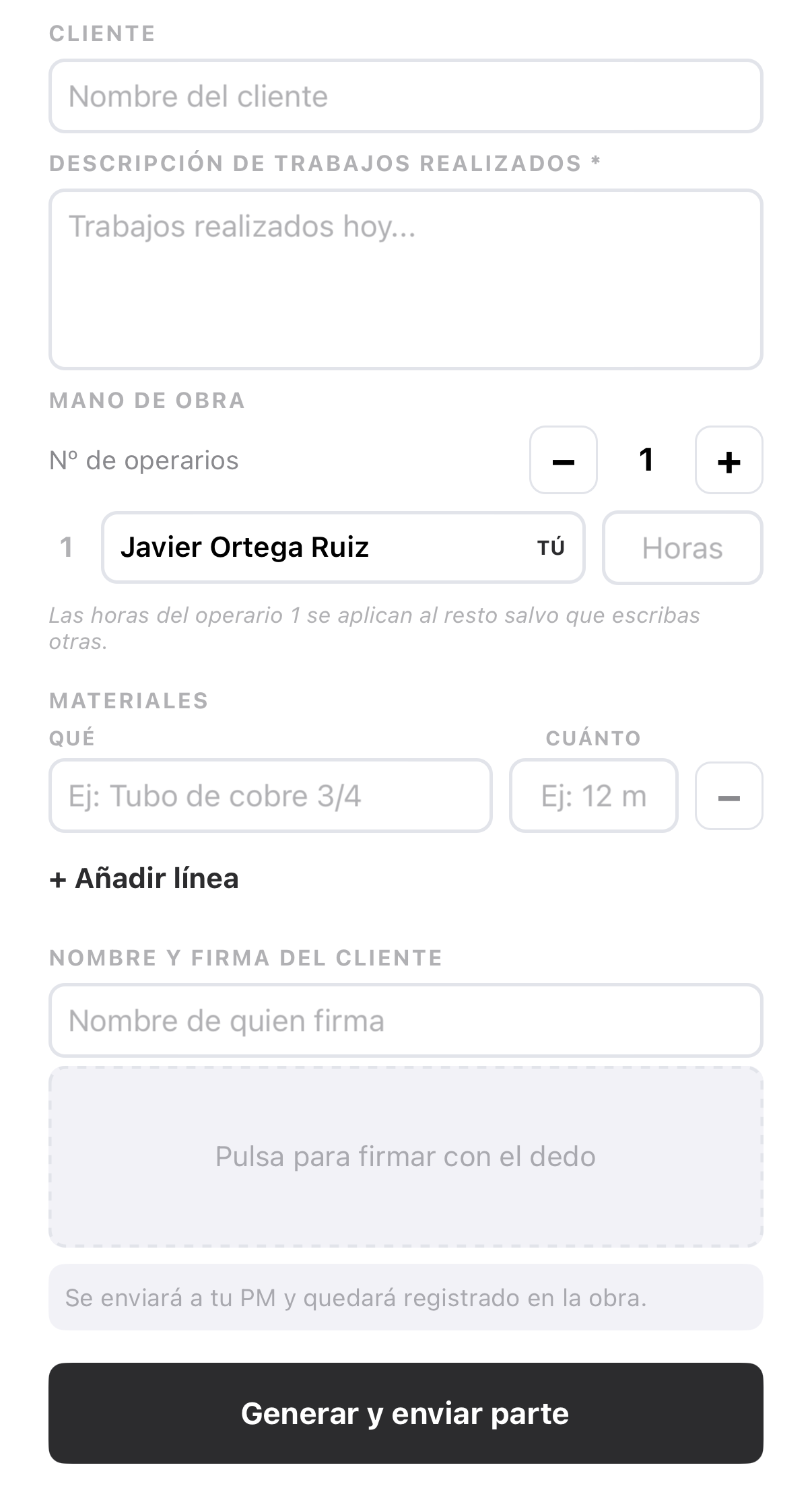
How a work report is done
The field worker opens it
From the project's documents or from the planning task just finished. In that case, the work report is linked to that task.
Writes down what was done
The customer, the description of the work, the labour (how many workers and how many hours) and the materials used, line by line.
The customer signs
The name of the person signing is entered and the customer signs with a finger on the phone screen.
The PDF is created
Zetein generates the PDF with its number. The field worker gives it to the customer on the spot: sharing it from phone to phone or sending it to their email.
It is filed
The work report reaches the office and is stored in the work reports folder of the project's documents.
Numbering
Each work report has a company number made up of the year and a counter, for example 2026-0001. The system assigns it when it receives the report; it is sequential and never repeats. The counter starts again each year.
What the office sees
Work reports arrive on their own, with nothing to transcribe. The office has the signed PDF in the project's documents and a list of all work reports with their number, date, project, customer, field worker and hours. The list can be filtered by date, by field worker and by project.
From there they go to Excel: all the filtered reports in one sheet, each report on its own sheet, or a single report. The Excel file includes the work done, the workers with their hours and the materials with their quantities, which is what the accounts team needs for invoicing.
No signal
A work report can be signed without signal. It is saved on the phone, sent automatically when coverage returns and then receives its number, with the year in which it was signed. The customer's copy is passed on the spot, from phone to phone; sending it by email does need coverage. What works without signal.
What it solves
- Paper work reports that arrive late, or never.
- Retyping at the office what the field worker already wrote.
- Unsigned jobs that are disputed later.
- Finding an old work report: the search finds them by number, customer, project, material or field worker.
Questions
How does the customer sign?
With a finger, on the field worker's phone screen. The name of the person signing must be entered first: without it, the work report is not generated. The signature appears on the PDF.
How many work reports can I create?
As many as you need. The price includes unlimited projects and work reports.
Can I send the work report to the customer?
Yes. When generating the report, the field worker can share the PDF from the phone or send it to the customer's email.
Can I create a work report for a job that is not part of a project?
Yes. From each field worker's individual planning you can create work reports for one-off jobs. In them, the project or the place of work is entered in a reference field, which is what appears on the PDF and in the Excel file.
Who sees the work reports on a project with subcontractors?
A work report by a subcontractor's field worker is seen by their company and by the main contractor. The main contractor's work reports are seen only by the main contractor.